-1.png?height=40&name=Logo%20Eversports%20Horizontal%20(1)-1.png)
General conditions & further information on the process
1. Calender
The ball sports calendar is a separate calendar showing the availability of the Reformers.
How is the calendar displayed?
-
Via a dedicated widget link that can be integrated into the website:
- Via a dedicated ‘Courts’ tab in the Eversports app and on the Marketplace:
This calendar is not displayed in the branded app.
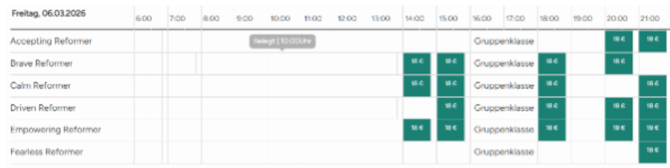
Parallel group classes and VoD Reformer
If courses are taking place at the same time, the ball sports calendar can easily be blocked manually. Whilst there is no automatic synchronisation between the studio and ball sports calendars, this simple manual step ensures that everything remains accurate..
-
Example: WeForm
2. Products
-
Memberships cannot be combined with existing studio memberships.
-
Services for the Studio Manager and the Ball Sports Manager cannot be combined.
-
Block cards for the Ball Sports Manager operate according to a different system. (They are used for courtbookings in Ballsports and for bookings of activities for boutique sports)
-
Separate products must therefore be created.
Use with Memberships:
At present, membership in the ball sports section can be easily managed via manual allocation. The process is as follows:
-
The customer books the membership.
-
You can then create a customer group and assign a €0 tariff to it. The customer is then added manually to this customer group.
-
From then on, the membership can be used without any problems.
Common challenges with memberships:
-
No deduction of units: No units are deducted from the membership – control is managed solely via the customer group (e.g. 2 bookings per day). This rule also applies to the studio area.
-
Manual cancellation process: If a membership is cancelled, the customer must also be manually removed from the customer group.
-
Assignment to the customer group is done manually.
-
An email notification is required for every cancellation.
-
An overview of the membership is available in the relevant tab.
-
Conclusion: In practice, the workaround really only works for unlimited memberships.
That is the current situation, but we plan to make this process even more user-friendly in the future.
3. Next steps
-
Define the model
If this model meets your requirements, please feel free to contact Support or the person with whom you signed your contract directly. The Ballsport Manager involves additional costs, which is why a new contract must be signed for it. You also have the option of booking automatic access control and lighting control. These options are subject to a charge.
-
Adjusting the technical configuration
Setting up the Eversports Ball Sports Manager
Once the contract has been finalised by the Sales Department, the Ball Sports team takes over.
You can find instructions on how to set up the Ball Sports Manager in advance here: Introduction to using the Eversports Ball Sports Manager.
Access Control (Automatic Access Control)
Requirements:
-
-
An access control system operates exactly one door.
-
All that is needed for it to work is a mains power supply – Wi-Fi is not required.
-
You are responsible for purchasing the electric door opener.
-
The hardware will be installed by an electrician you hire, at your own expense.
-
Access is activated via a QR code, which is displayed to the customer(s) in the booking confirmation email.
-
This code is valid only for the duration of the booking, including the pre- and post-booking periods.
-
You have a universal QR code that you can use to open the door at any time. You can also update this QR code in your Eversports Manager at any time, which will invalidate the ‘old’ code.
-
Technical implementation & further information:
-
-
You can find further information on the access control system here: Access Control via QR Code
-
Manufacturers and partners in the DACH region: Comydo
-
Once the Eversports Ballsport Manager has been set up, please contact smile@eversports.com directly for assistance with the hardware setup.
Please also contact support@eversports.com with any other enquiries.
Access Control tariff:
|
Position |
Costs |
|
Hardware (one time payment) |
1.378 € exkl. USt.
|
|
Access Control (monthly) |
29 €/month |
In addition, the Eversports Manager software package (group classes) is subject to standard pricing, which is tiered according to the number of monthly bookings.