-1.png?height=40&name=Logo%20Eversports%20Horizontal%20(1)-1.png)
As a teacher or trainer who is using a digital calendar app, such as Google Calendar, Apple Calendar, or Outlook there’s an easy way to add the appointments that are assigned to you in the Eversports Manager of a specific venue in your calendar app - via a calendar subscription. Once subscribed, your scheduled appointments will automatically appear in your personal calendar and stay up to date. This subscription provides you with the relevant appointments from 1 week ago up until 4 weeks in the future.
In case you are an administrator or leading employee you can subscribe to the calendar of the particular venue. This comes in handy when you organize other appointments such as room rentals via another digital calendar and need an overview of all appointments happening at this venue.
Here’s how you can set this up.
🔧 1. Get Your Calendar Subscription Link
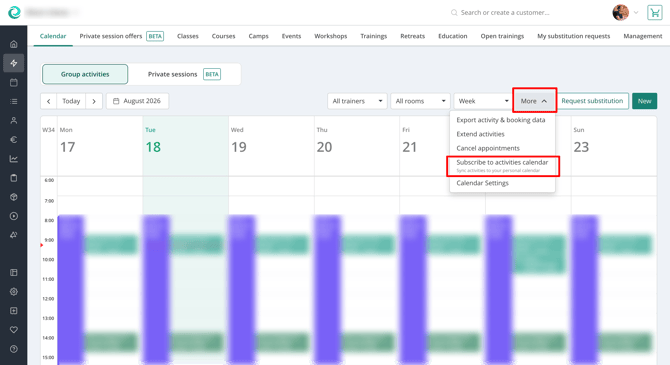
- Open activities calendar in the Eversports Manager
- Click on the more menu and choose the calendar subscription option
- Copy the calendar subscription link
You'll need this link when following the instructions for your calendar provider below.
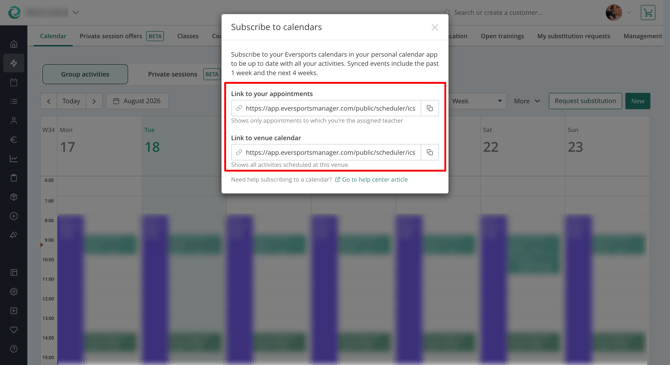
❗️Important: don’t share your calendar URL with other people. In case you did, please inform our support about it.
➕ 2. Add a new calendar in your calendar app
To add your sports calendar to your calendar app, please follow the provider's official instructions:
-
Subscribe to a calendar in Apple Calendar on an iPhone or Mac
- Subscribe to a calendar in Outlook / Microsoft 365
💡 3. Important to consider
- Calendar subscriptions are read-only. Events must be managed in the original activities calendar in the Eversports Manager.
- Updates to your activities calendar are automatically reflected in your subscribed calendar.
- The frequency of updates depends on your calendar provider and may vary.
- If you stop receiving updates, remove the subscription and add it again using the latest calendar subscription link.
- You subscribe to appointments from one week ago up until 4 weeks in the future