-1.png?height=40&name=Logo%20Eversports%20Horizontal%20(1)-1.png)
Where can I see my submitted e-invoices?
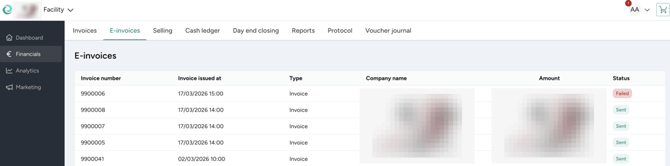
If you have enabled E-Invoicing extension, then in your Eversports Manager, you can find an overview of all invoices that were automatically picked up and submitted as e-invoices on your behalf.
Go to Financials > E-invoices tab. For each e-invoice you will see:
-
Invoice number – The reference matching the invoice you issued to your B2B customer (same as on Invoices tab)
-
Invoice issued at – When it was sent to the PEPPOL network
-
Type - Invoice or Credit note (reversal)
-
Company name - Your customer company name to whom e-invoice was sent
-
Amount - Invoice amount, exactly as on invoice
-
Status – Whether the submission was successful or not
What do the statuses mean?
-
Sent - Your invoice was successfully submitted to the PEPPOL network.
-
Failed - Something prevented the e-invoice from being submitted to PEPPOL network.
Note: Sent does not guarantee the e-invoice was delivered to your customer. It means it was successfully submitted to PEPPOL network. If the recipient cannot be reached through PEPPOL, the invoice will be delivered to them via email instead with XML document attached. This is standard and expected PEPPOL behaviour.
What should I do if an e-invoice submission has failed?
Please contact our customer support team. We will look into the reason for the failure and help re-submit the e-invoice on your behalf.
For any other questions about e-invoicing, our support team is happy to help as well.
Why would an e-invoice submission fail?
Common reasons for a failed e-invoice submission include:
-
Missing or incorrect VAT ID number on the customer's profile
-
Missing or incomplete address (street, city, or postal code)
-
Incomplete details on the invoice
-
A temporary network issue
Need help? 💬
If you have questions or need help setting up the extension, our support team is happy to assist. You can contact us via email support@eversports.com or via the chat bubble in your manager.