-1.png?height=40&name=Logo%20Eversports%20Horizontal%20(1)-1.png)
Important: This article is only important for venues in Italy.
What is the medical certificate in Italy?
In Italy, sports providers are often required to ensure that customers participating in physical activities present a valid medical certificate (“certificato medico non agonistico”).
This certificate confirms that a person is fit to take part in non-competitive sports activities such as: Yoga, Pilates, Fitness classes, Dance or similar activities.
The certificate is issued by a doctor and is typically valid for one year.
Why is this important for your studio?
For many sports activities in Italy, requesting a valid medical certificate is part of running a compliant and safe operation.
From what we’ve seen in the market:
-
Providers are expected to check that a certificate exists and is valid
-
Allowing participation without verification can lead to liability risks
-
Keeping track of certificates manually can quickly become complex and error-prone.
How Eversports supports you
We built this feature to help you manage medical certificates in a simple, practical, and GDPR-friendly way.
How the feature works in Eversports Manager
1. Activate the feature
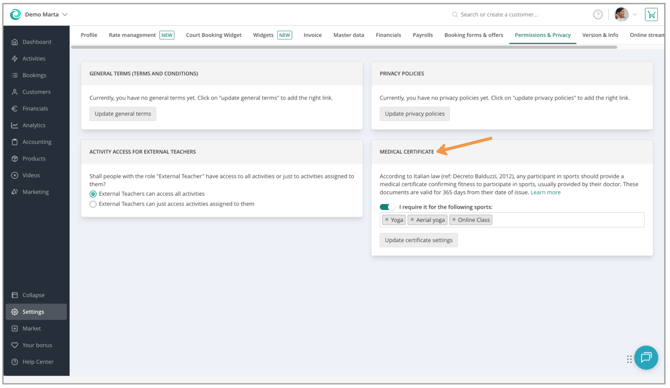
Go to your Eversports Manager → Settings → Permissions & Privacy:
-
Enable the toggle under Medical Certificate → "I require it for the following sports"
-
Define which sports you require a certificate for, and click "Update certificate settings". Per default, all of your sports are preselected for you.
2. During booking (customer side)
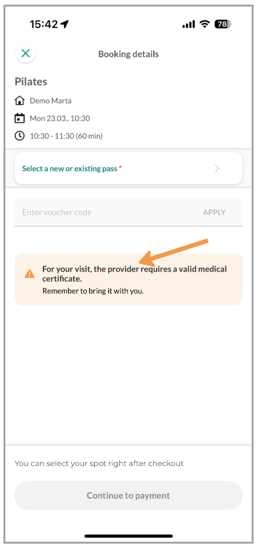 When your customers book an activity, they will see a message if the certificate is missing, expired, or soon to be expired.
👉 Bookings are not blocked, but customers are informed and asked to bring a valid certificate with them to their next activity.
We intentionally allow bookings even if a certificate is missing or expired, as many studios prefer to clarify the situation in person on-site with the customer. This gives you the flexibility to check the certificate directly and decide how to proceed. If a customer cannot present a valid certificate, you can still choose to deny participation on-site if needed.
3. Verify certificates during activity sign-in
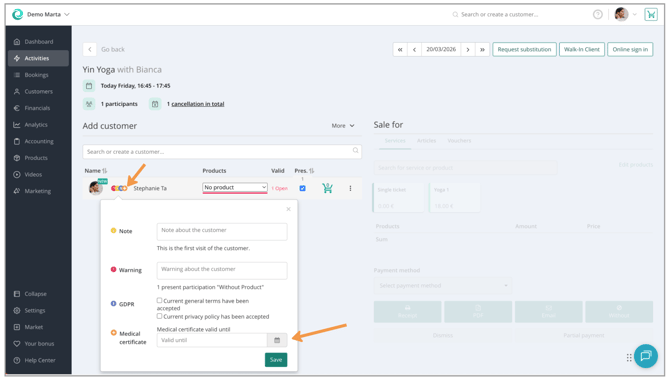
Check the certificate on-site before the activity starts, e.g. during their first visit. For each activity sign-in, the manager checks if a customer's certificate is missing. Customers without a valid certificate are highlighted with a warning icon.
-
Click on the orange warning icon to see the status of the certificate
-
you can directly enter or update the expiry date
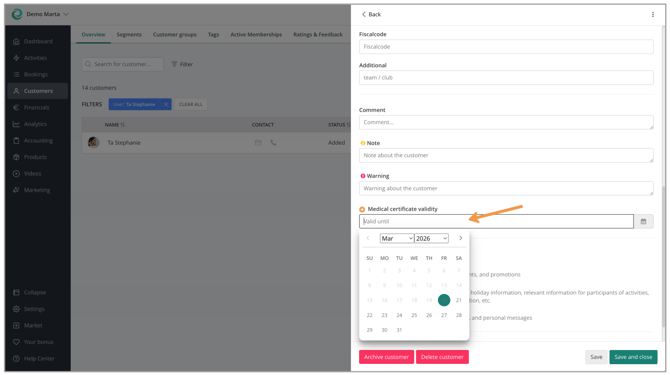
4. Manage certificates in the customer profile
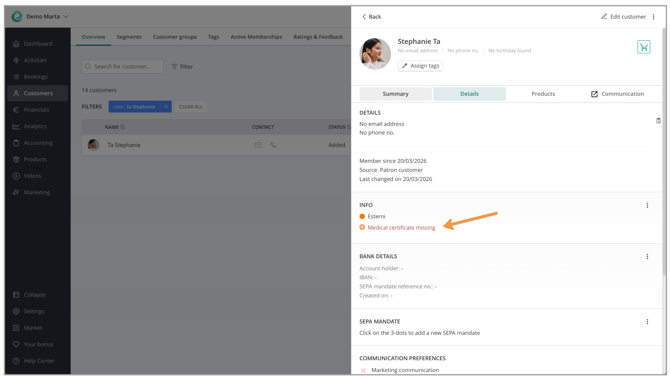
You can manage the certificates in the customer profile:
-
For each customer, we show the status of the medical certificate
-
If you "edit customer", you can directly enter or update the expiry date.
👉 Entering the expiry date means you have checked the certificate and confirmed its validity.
What's important for you to know
-
Eversports supports you by:
-
Giving you visibility on certificate status
-
Helping you manage expiry dates
-
Informing customers during booking
-
-
Studios are responsible for checking and managing certificates
-
You keep full control over the verification process
-
You can manage certificates without manual spreadsheets or notes
-
You reduce the risk of overlooking expired or missing certificates
-
-
No medical documents are stored → simple and privacy-friendly
If you have any further questions, please don't hesitate to contact our support team.