-1.png?height=40&name=Logo%20Eversports%20Horizontal%20(1)-1.png)
You can sync your personal calendar with Eversports Manager to automatically block your busy times and help prevent double bookings.
When your personal calendar is synced, events from your calendar are used to determine your availability.
🔧 1. Get Your Calendar Subscription Link
To sync your personal calendar, you'll need a calendar subscription link (also called an iCal or ICS link) from your calendar provider.
Once you've copied the link, navigate to Sync busy times from the personal calendar in Activities > Private sessions > My availability, paste the link into the Calendar subscription link field, and click Sync calendar.
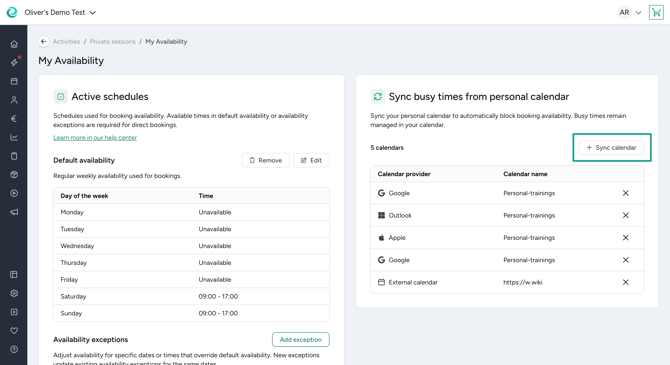
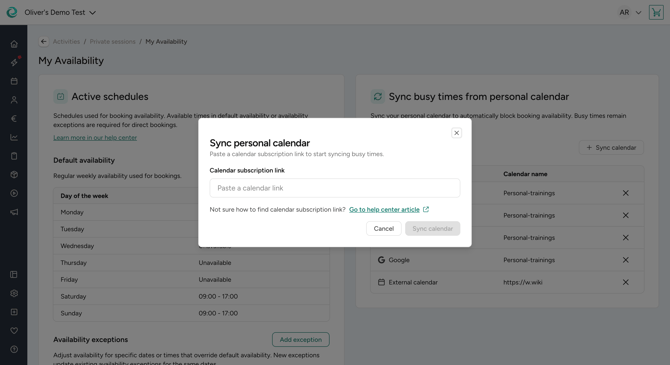
Please find the resources for the most common calendar providers below and follow their instructions on how get the subscription link.
1.1 Google Calendar
To find your Google Calendar subscription link, follow Google's official instructions:
Sync your calendar with computer programs
Use the Secret address in iCal format for the calendar you want to sync.
1.2 Apple Calendar (iCloud)
To generate a subscription link for your iCloud calendar, follow Apple's official instructions:
Share a calendar on Mac
You need to generate an ICS link and paste it into Eversports Manager.
1.3 Outlook / Microsoft 365
To generate a calendar subscription link from Outlook, follow Microsoft's official instructions:
Share your calendar in Outlook on the web
You need to generate an ICS link and paste it into Eversports Manager.
💡 2. Important to consider
- Only the calendar you choose to share will be used to determine your non-availability.
- Changes made in your personal calendar may take some time to block your availabilities for private sessions in the Eversports Manager.
- If you regenerate, revoke, or disable the calendar link, you'll need to update the link in the Eversports Manager.
- Keep your calendar subscription link private, as it may allow access to your calendar information.