-1.png?height=40&name=Logo%20Eversports%20Horizontal%20(1)-1.png)
Writing emails can be time-consuming - especially if you regularly send marketing campaigns or set up new automations.
With our new AI feature, you don’t have to start from scratch anymore: simply describe what you want to say, and the AI will generate a professional email draft for you.
🤖 What can the AI do for you?
The AI assistant helps you create emails faster and more efficiently - whether for one-time campaigns or automated email journeys. It understands the context of your studio, your offerings, and your communication style, and generates tailored content.
You can find the AI feature in two places in the Eversports Manager:
-
when creating (manual) one-off-communications under Marketing > Contacts > Create email or Marketing > All emails > Create new email
-
when creating automated communication under Marketing > Automations > Create automation
💡 Two ways to create your email
The AI supports both available email types:
Rich Text Editor:
The AI generates the text content of your email (greeting, body text, signature). You can then edit and format the text as you like.
Drag & Drop Designer:
The AI creates a visually designed email template with your content. You can further customize it—adjust colors, add images, or rearrange blocks.
🚀 How it works – step by step
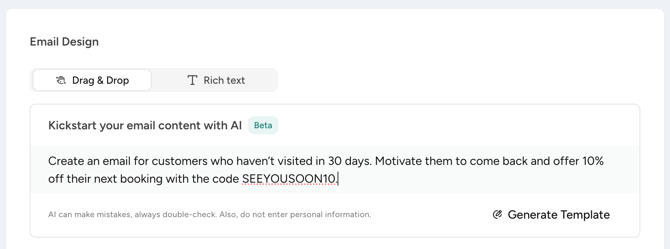
-
Choose your email type
Select either the Rich Text Editor or the Drag & Drop Designer. -
Enter your prompt and describe what you need
In both editors, you’ll find an input field labeled “AI Assistant”.
Write in natural language what your email should achieve. The more specific you are, the better the result. (see tips for prompts further below) -
Click “Generate template”
The AI creates an email draft for you within seconds. -
Review and edit the draft
The AI gives you a strong starting point - you can adjust, expand, or rewrite the content as needed. -
Send or save your email
Once you’re happy, you can click "Apply" and either save it as a draft, or send the email directly.
✨ Tips for the best results
-
📝 Be specific: The more detailed your description, the better the output. Instead of “Write an email,” try: “Write a motivating email for customers who reached 10 visits.”
-
🎯 Define your goal: Tell the AI what you want to achieve—activate customers, inform them, motivate them, or drive purchases.
-
💬 Set the tone: Do you want a warm, professional, or casual tone? Mention it in your prompt.
-
🎁 Include offers or details: If you want to include a discount, gift, or specific class times, add them directly in your input.
-
🔁 Try multiple times: You can regenerate and experiment with different inputs as often as you like.
Examples of good prompts:
- “Write a friendly welcome email for new customers. Explain how to find our studio and what they should bring to their first class.”
- “Create an email for customers who haven’t visited in 30 days. Motivate them to come back and offer 10% off their next booking with the code SEEYOUSOON10.”
- “Write a birthday email in a warm tone in German. Offer a free smoothie on their next visit as a gift.”
- “Create a reminder email for customers who bought a trial offer but haven’t booked a class yet. Encourage them to take the first step.”
🧠 The AI understands your studio and automation context
The AI has access to important information about your studio, such as:
- Your offerings: Classes, workshops, and sports types can be included in the generated content
- Your products: Memberships, trial offers, or class passes are already known to the AI
- Your studio details: Address and other stored information, including FAQs for your customers
This means the AI doesn’t generate generic text—it creates drafts tailored to your studio.
When used in automations, the AI also considers the context of your emails:
- Automation title: Helps the AI understand the purpose
- Description: Used to generate more relevant content
- Email subject: The content is aligned with your subject line
- Trigger event: The AI adapts the tone and content depending on the occasion:
- Birthday emails: Warm, personal tone with optional gifts or discounts
- Milestone emails (e.g. after 10 visits): Congratulates and motivates customers to keep going
- Product purchase emails: Creates welcome emails or reminders tailored to the purchased product
- Specific activity visit emails: Creates emails based on the activity that the customer visited
This results in more relevant and effective email drafts that automatically align with your setup.
⚠️ This feature is in beta
Our AI assistant is currently in beta. This means:
-
✅ The feature is fully usable and already delivers strong results
-
⚙️ We are continuously improving it - your feedback helps us make it even better
-
📝 Always review generated content before sending. The AI is an assistant - the final check is yours
-
🔒 No data is shared with the AI unless you actively use the feature