-1.png?height=40&name=Logo%20Eversports%20Horizontal%20(1)-1.png)
The Referral Program helps you grow your community through recommendations from your existing customers. Reward loyal customers for inviting their friends and encourage new customers to book their first activity with your studio.
You decide what rewards to offer, activate the program in just a few clicks, and let Eversports take care of generating referral codes and tracking successful referrals.
✨ Key Benefits at a Glance
- Reward both new and existing customers for successful referrals
- Customize rewards to fit your business, from discount codes to unique studio perks
- Encourage organic growth through trusted personal recommendations
- Manage your referral program directly from Eversports Manager
Before setting up your Referral Program, keep the following in mind:
- The program applies to all venues within your company.
- Only new customers can be referred.
- Family account members cannot be referred.
- Customers can only receive a reward after their referred friend has completed their first visit.
🧑💻 Set Up Your Referral Program
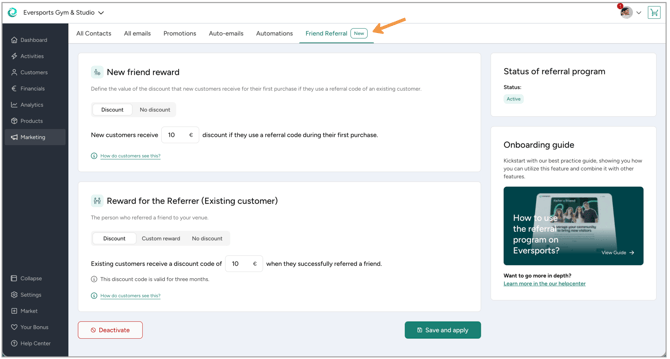
1. Open the Referral Program settings
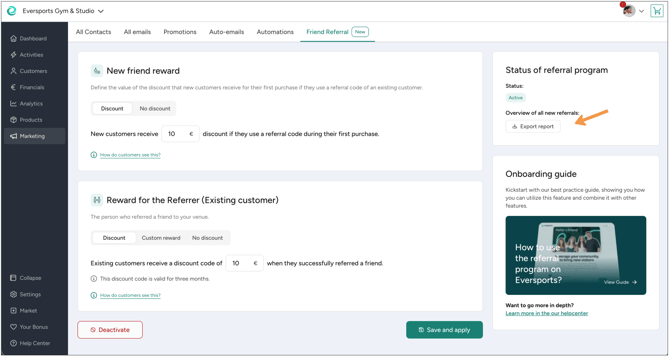
Go to Marketing → Friend Referral.
This is where you can configure the rewards for both new and existing customers.
2. Configure the reward for new customers
Choose what a newly referred customer should receive when they use a referral code during checkout.
You can choose between:
- Discount – Enter a fixed discount amount (greater than €0).
- No discount – New customers won't receive an incentive.
The discount is automatically applied when the customer enters a valid referral code during checkout.
3. Configure the reward for existing customers
Next, decide how you'd like to reward the customer who made the referral.
You can choose between:
- Discount code – The customer automatically receives a discount code after their friend completes their first visit.
- Custom message – Describe a reward that you'll provide yourself.
- No reward – The referring customer won't receive a reward.
If you choose a custom reward, you'll be responsible for managing and redeeming it at your studio.
Examples include:
- Free shake on the next visit
- 25% off the next workshop
- Branded merchandise after five successful referrals
Note: Discount code rewards remain valid for three months after they are issued.
4. Save and activate your Referral Program
Once you've finished configuring your rewards:
- Click Save and Activate.
Your Referral Program is now live and available to eligible customers.
🔄 How the Referral Process Works
Once your Referral Program is active, referrals happen automatically.
- An existing customer have access to their personal referral code.
- They share the code with a friend using their preferred communication channel (such as WhatsApp, email or social media).
- The new customer enters the referral code during checkout when booking their first activity or purchasing their first product.
- The referral discount is applied automatically (if configured).
- After the new customer completes their first visit, the referring customer receives their reward.
Please note:
-
If you selected a discount code reward, it will automatically appear in the customer's account.
-
If you selected a custom reward, you'll need to provide and track the reward yourself.
📱 What Your Customers See
Note: The Referral Program is currently available on the Eversports website and in the Eversports app. It is not yet available in widgets or branded apps.
Customers can access their referral codes in two places.
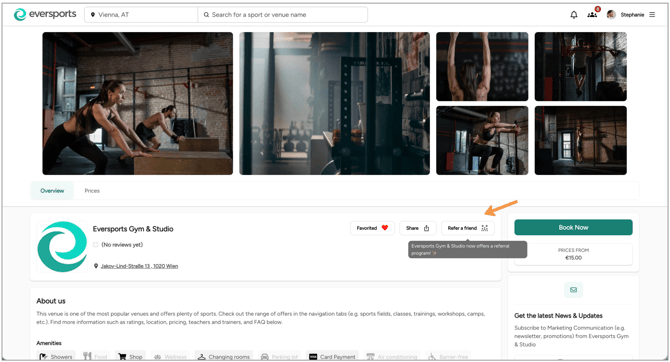
From your venue profile
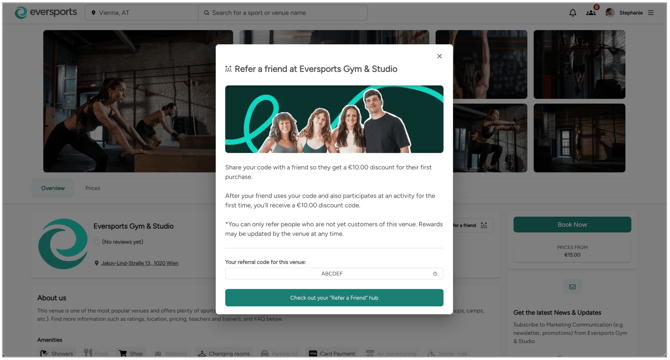
Customers who have previously booked or visited your venue will see a Refer a friend option on your public venue profile.
From there they can:
- View your referral offer
- Copy their personal referral code
- Share the referral message with friends
- Access their Referral Hub
From their Referral Hub
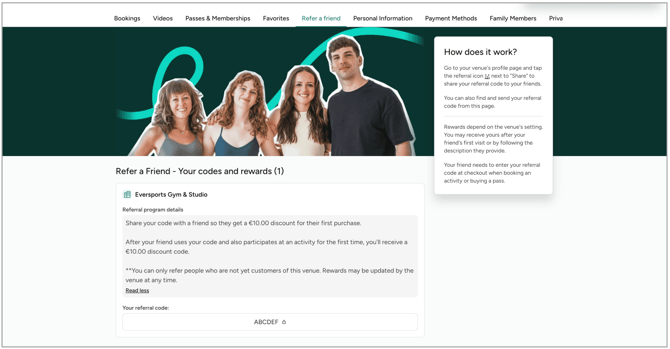
Customers can also access Refer a friend from their Eversports profile > Refer a friend.
Here they can:
- View all studios that offer them referral rewards
- Access their personal referral codes
- See which friends they've successfully referred
- View their available rewards
- Check reward expiry dates
📊 Export Your Referral Report
Want to see exactly who's joining your community through referrals — and what they're purchasing? You can now export a report listing all of your newly referred customers.
The report includes:
- Name of the referred customer
- Email address
- Date of first purchase
- First product purchased
- Date of first visit
- Referring customer (who referred them)
Where to find it:
You can export this report from two places:
- a) Go to Marketing → Friend Referral, and use the export option in the top right box.
- b) Go to Analytics → Reports, and look under the Marketing section.
What you can do with this data:
- Identify your newly referred customers — tag them in your customer list so you can recognize this segment later, whether at the register, in a targeted email, or with a special offer.
- Spot popular products among new customers — see which products newly referred customers purchase first, giving you insight into what attracts this segment.
- Recognize your most influential customers — find out which existing customers are referring the most new business, so you can reward them personally or simply thank them on their next visit.
Tip: Since the report includes the referring customer for each entry, it's an easy way to spot your program's biggest advocates over time — not just who signed up, but who's driving your growth.
💡 Reward Ideas
Not sure what rewards to offer? Here are a few proven approaches, depending on what you'd like to achieve.
🌱 Balanced growth (Recommended)
Encourage both new customers to book and existing customers to keep sharing.
- New customer reward: €10 discount
- Referring customer reward: €10 discount
This balanced approach creates a strong incentive for both sides and is a great starting point for most studios.
💰 Keep reward costs low
Reduce your overall reward costs while still encouraging first-time bookings.
- New customer reward: €5 discount
- Referring customer reward: No reward
A good option if your main goal is lowering the barrier for new customers without increasing reward costs.
🚀 Focus on acquiring new customers
Offer a stronger incentive to encourage more people to try your studio.
- New customer reward: €15–20 discount
- Referring customer reward: €10 discount
This approach requires a higher investment but can significantly increase first-time bookings.
❤️ Reward loyal customers
Recognize your biggest advocates without discounting a customer's first purchase.
- New customer reward: No reward
- Referring customer reward: €10–15 reward
This works well if you want to strengthen customer loyalty and thank your most engaged customers for recommending your studio.
⭐ Create a premium experience
Offer an exclusive in-studio reward instead of a discount.
- New customer reward: No discount or a small discount (e.g. €5)
- Referring customer reward: Custom reward
Some ideas for custom rewards include:
- Free protein shake or coffee
- Free towel rental
- Studio merchandise
- Priority booking for a special event
- A complimentary upgrade
Tip: Custom rewards are managed by your studio and aren't automatically tracked or redeemed in Eversports. Choose rewards that your team can easily provide in person.
❓Frequently Asked Questions
Can I change my rewards after activating the Referral Program?
-
Yes. You can update your rewards at any time.
Important: If you change your reward settings later, existing rewards that have already been earned won't change. Your updated settings only apply to future referrals and newly earned rewards.
Can I disable the Referral Program?
-
Yes. You can disable the Referral Program whenever you like from Marketing → Friend Referral.
Can existing customers be referred?
-
No. Referral rewards are only available for customers who are new to your studio.
Can customers refer themselves?
-
No. Self-referrals are not allowed.
-
Family account members also can't be referred, helping prevent misuse of the program.
How are custom rewards redeemed?
-
Custom rewards aren't managed automatically by Eversports.
-
You'll need to provide the reward yourself and keep track of redeemed rewards within your own studio processes.
Can customers use referral codes at different venue locations?
-
Yes. Referral discount codes work across all venues within the same company. However, they can only be used once for a customer's first visit.
Why hasn't my customer received their reward yet?
-
The referring customer receives their reward after the referred friend completes their first visit.
-
If the new customer hasn't attended yet, the reward won't be issued.
How long are rewards valid?
-
Discount code rewards for existing customer are valid for three months after they are issued (discounts get issues after their referred friend's first visit)