-1.png?height=40&name=Logo%20Eversports%20Horizontal%20(1)-1.png)
Block cards, time cards, and memberships allow your customers to participate in a set of activities or provide access to certain videos. Participation limits control how customers use their allowance across that assignment: as one shared pool, or split into separate allowances per activity. This allows you to offer products like these:
- Pilates split pack: 1 unit for mat pilates classes, 1 unit for Swiss ball classes plus 1 unit for reformer classes to try out your different class formats
-
Mixed personal & group training membership: 4 group training sessions and 1 personal training per month
-
On-site & On-demand pass: 30 day pass with 2 on-site classes per week and unlimited access to your video library
- Group workouts & Open Gym: 1 WOD per day and unlimited access to open gym
1. Choosing a limit type
When you create a product like a block card, time card, or membership, you need decide on the limit that you want to apply.
❗️Be aware: you can't change the way how to limit participations after you have created a product. So choose the desired option between no limit, a general limit with a shared pool or multiple limits wisely.
You can generally limit your products by these options:
-
General limit: customers can use any of their units or participations for any of the assigned activities. This is best for products where every activity should draw from the same pool.
Example: A time card that allows you to use 8 units freely across Yoga, Pilates, and Barre.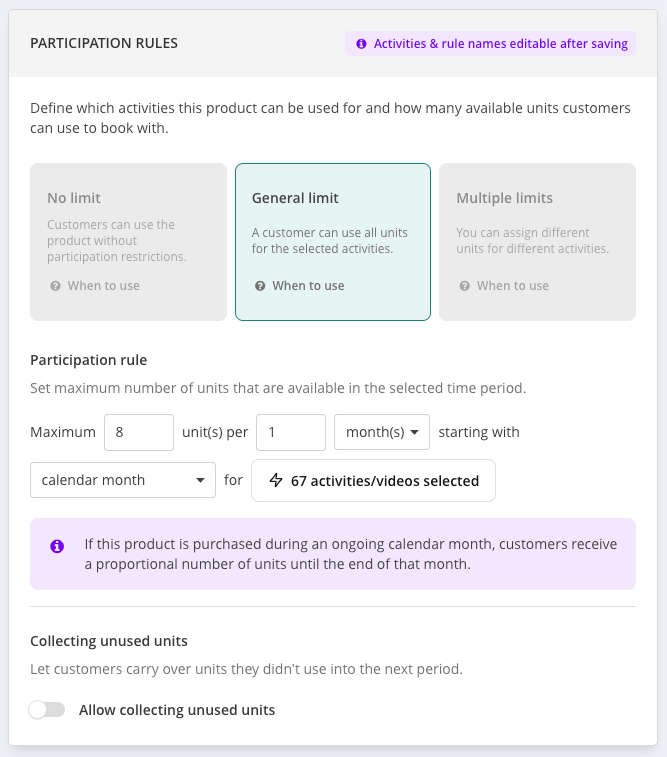
-
Multiple limits: each assigned activity (or activity group) gets its own separate allowance. Customers use up the allowance for one activity without touching what's available for another, and each allowance is tracked and reset independently. This option is best for products that combine activities that shouldn't compete for the same spots, for example a high-demand activity and a lower-demand one.
Example: A membership with 4 mat pilates participations and 1 reformer participations per month. A customer who books 4 mat pilates classes in the first week still has 1 reformer class available for the rest of the month; they can't "spend" the reformer's allowance on extra mat pilates classes, and vice versa.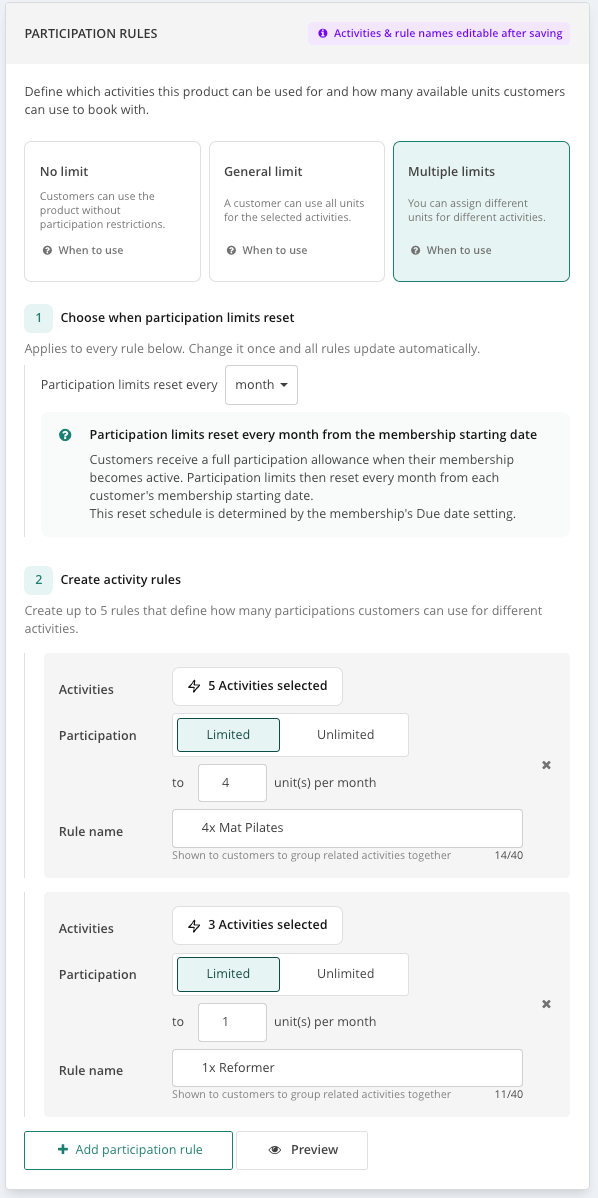
💡 For block cards you always need to define the available units that your customers can use. However, for time cards and memberships you also have a "No limit" option that gives you customers unlimited access to the selected offer during their validity.
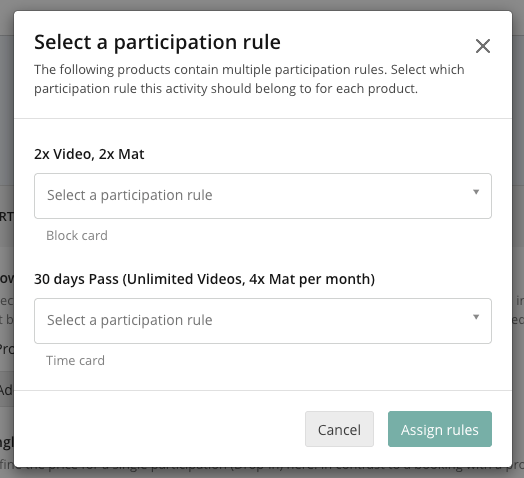
In case that you create a new activity and you select a product that can be used to participate in this activity that has multiple participation rules set up, you'll need to select the rule which will be applied when a customer tries to book this activity with this product.
2. How multiple limits behave per product type
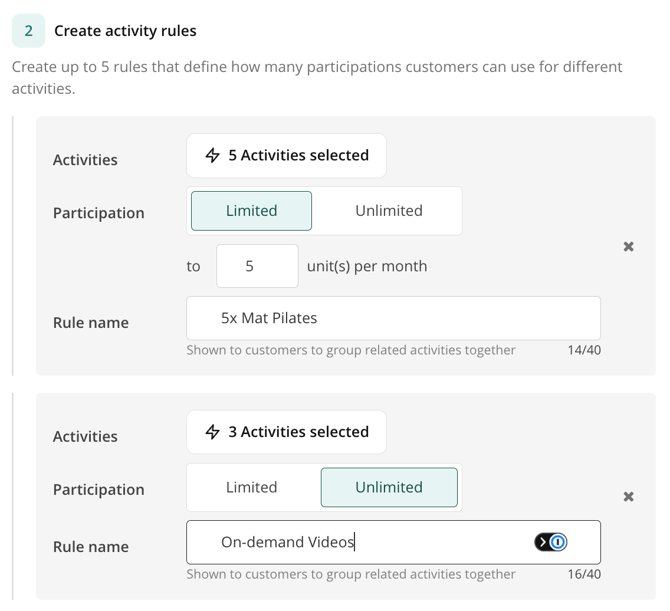
The settings and behaviour of multiple limits differ between block cards and other products such as time cards and memberships. What is always shared between all products is that for each rule you need to select the activities that this rule is applied to, the available units and you need to choose a rule name. As there can be quite a big number of activities linked to one rule, it might be hard for a customer to get a proper understanding of what this rule means. Therefore, choose a descriptive name that's easily digestable, e.g. "5x Mat Pilates classes", "Unlimited on-demand videos", etc. You can also check out the rule preview to see how the information is shown to your customers.
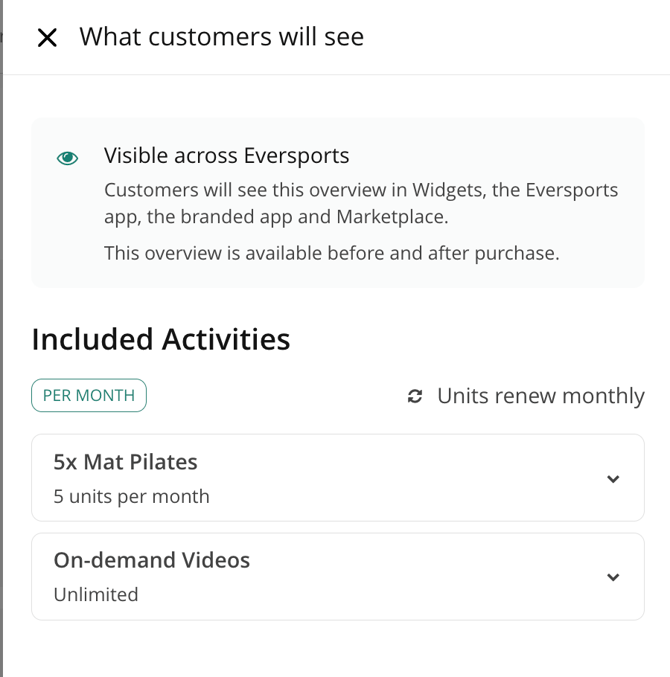
Let's get into the differences in the settings and behaviour.
Block cards
Block cards have a fixed total number of units, set once at creation. Units don't reset. Whilst the general limit shares that total available units across all assigned activities, multiple limits splits it into fixed, separate allowances per activity that customers use down over the card's lifetime for the selected activities.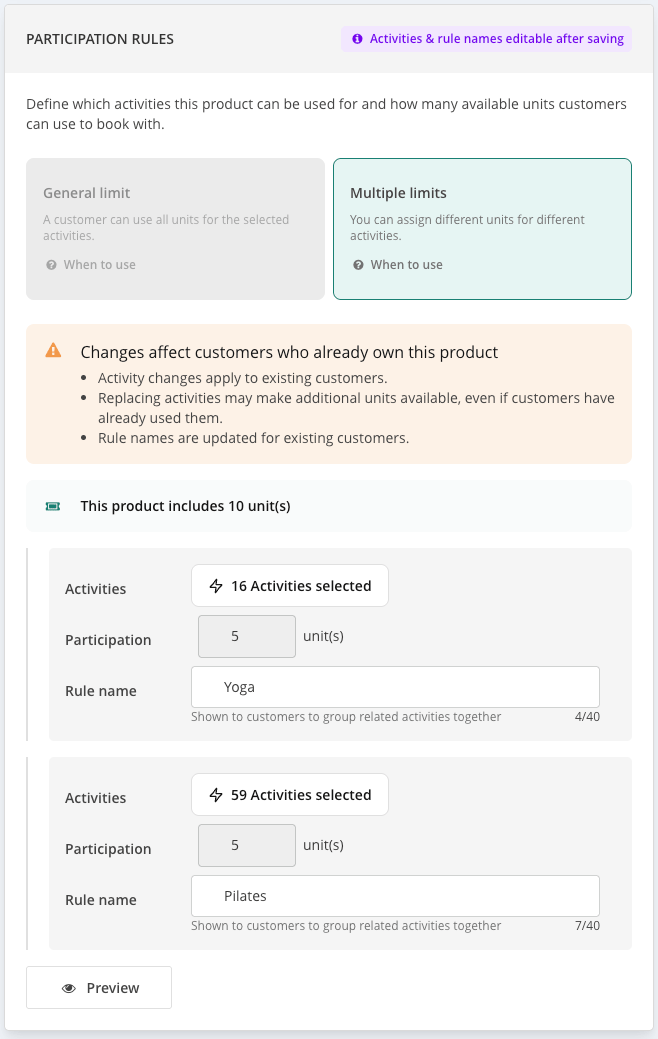
Time cards & memberships
For time cards and memberships that use multiple limits you can decide first during which time period the available units can be used. This can be daily, weekly, or monthly. Then you need to define between 2 to 5 rules that should be applied for different activities and videos. Customers can use the available units within the chosen period.
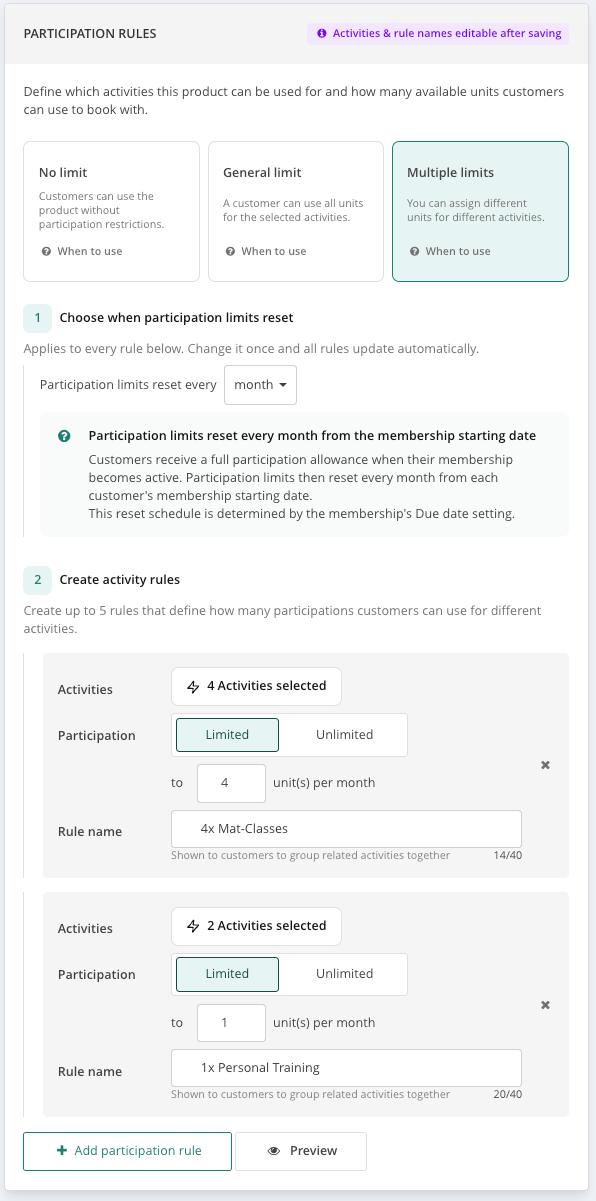
Units will reset for your customers:
- For timecards: In alignment with the the purchase date for timecards
- For memberships:
- In alignment with the purchase date for if due date for memberships billing is set to purchase date
- In alignment with the calendar month/week if the due date for membership billing is set to anything else other than the purchase date (e.g. the 1st of the month).
💡 Customers can book as far ahead during the time cards' and memberships' validity as they want. The available units are always considered for each period that the booking is made in and can't be exceeded.
In case you have an auto-extending membership, customers can also book with it later than the current validity end of the membership - but of course within the product's rule limits.
3. Limitations of multiple rules
Please be aware that this feature is currently in development.
💡 You can already set up products with multiple rules and these rules will be taken into account when customers book via any application or if you book for customer via the Eversports Manager.
However, there are certain temporary limitations that you still encounter. Apart from this, certain other settings that you might know from the general limit option are not available for multiple limits to keep the complexity and support efforts low - both for you and your customers:
- The limit information in the products tab in the customer profile does not show the multiple rules for a product yet. This is currently being developed so that you have a correct overview about the limits.
- You cannot use the unit collection option for products with multiple rules.
- The participation rule cycle in which the available units can be used is either a day, a week or a month. No multiple of these are possible, so you can't use settings like 4 weeks, 12 months, etc.
- You cannot manually adjust the units for sold block cards with multiple limits.
-
You can no longer change the participation limit reset period or the available units of the rules after the product has been created. However, you can still change the rule name and assign new activities to a rule.
❗️Attention: Please avoid changing the due date of memberships with multiple rules afterwards, as this will change the limit calculation for existing bookings with this membership and might result in exceeding the booking limits in certain periods.
We hope that you enjoy our new feature and can market your offer now even better. If you have any questions, please don't hesitate to contact our support team.