-1.png?height=40&name=Logo%20Eversports%20Horizontal%20(1)-1.png)
Note: This article is intended for end customers only. If you're a studio and would like to delete a customer profile, please refer to this article: Remove or Delete Customers
Delete Your Account via the App
You can delete your Eversports account easily and directly within the Eversports app:
- Open the Eversports app on your smartphone.
- Tab on your profile (bottom right).
- Select Edit Personal Data.
- Scroll to the bottom and tap on Delete User Account.
- Confirm the deletion.
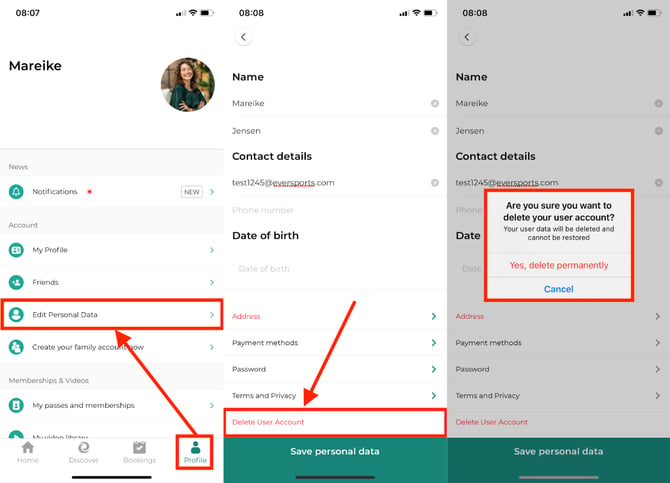
Important: Deleting your account permanently removes your Eversports login and personal profile data. This action cannot be undone. Your booking history and any data held by sports providers you've booked with is not deleted (see below.
Delete your account via the web version
You can also delete your Eversports account directly via our website:
- Log in to your Eversports account at www.eversports.com.
- Click on the three lines in the top right corner next to your first name.
- Select My Personal Information.
- Scroll to the very bottom and click the red "Delete your account" button.
- Confirm the deletion.
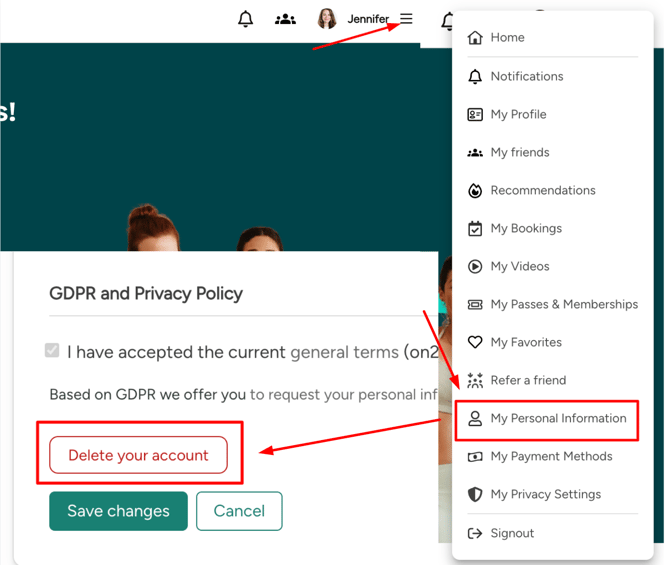
Important: Deleting your account permanently removes your Eversports login and personal profile data. This action cannot be undone. Your booking history and any data held by sports providers you've booked with is not deleted (see below).
When You Can't Delete Your Account
In some cases, you won't be able to delete your account right away. This happens if:
- You have family members connected to your family account. Remove them in your Family Account settings first, then try again.
- You have an open payment obligation - for example an unpaid invoice or an active membership. Contact the relevant venue directly to resolve it, then try again.
- You have an active role at a venue's Eversports Manager (e.g. admin, employee, trainer). Contact the relevant venue directly to have this role removed, then try again.
Once the issue is resolved, you can return to account deletion and complete the process.
Important Note for Existing Bookings, Passes and Memberships
Deleting your Eversports account does not delete any data or bookings held by partner studios or sports providers you've booked with - that data remains with them, since Eversports is not authorized to act on their behalf.
If you would also like your data deleted at a specific venue (e.g. personal information, bookings, purchases), you can contact the relevant partner directly directly to request this.
You can find the contact details of our partners either via the Eversports App or on our website www.eversports.com.
Note: Eversports acts as an independent data controller in relation to our partners and is therefore neither authorized nor obligated to act on their behalf.
If you have any questions, feel free to reach out to us at any time at help@eversports.com.