-1.png?height=40&name=Logo%20Eversports%20Horizontal%20(1)-1.png)
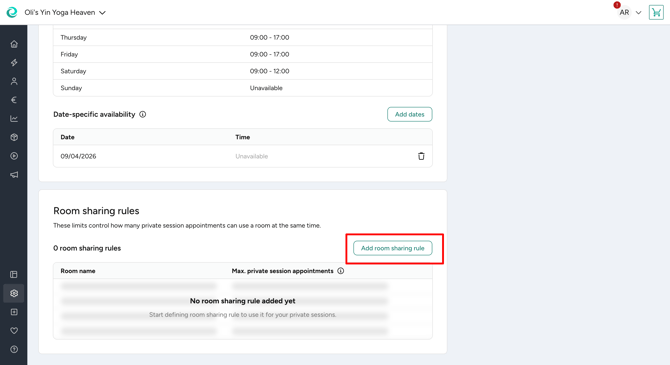
Room sharing rules let several private sessions use the same room at the same time. Instead of blocking out a whole room for one private session, you set a limit for how many private session appointments can use the room at once.
The rule only counts appointments, not participants. A limit of 4 means up to 4 private session appointments can run in the room at the same time, no matter how many people join each one.
➕ 1. Add a room sharing rule
Navigate to Market > Private Session Settings > Room sharing rules to create a new rule.
- Click Add room sharing rule.
- Select the room the rule should apply to.
- Enter the maximum number of private session appointments allowed in this room at the same time.
- Save your rule.
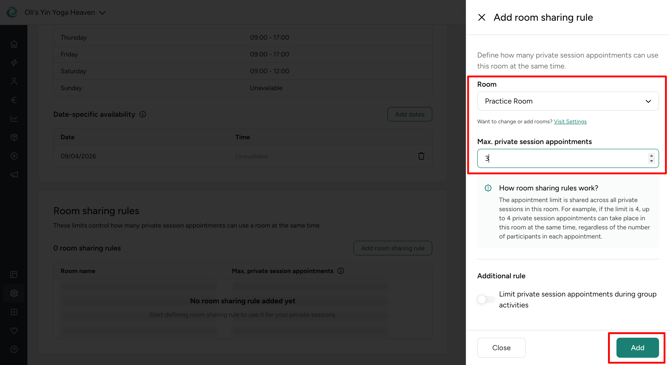
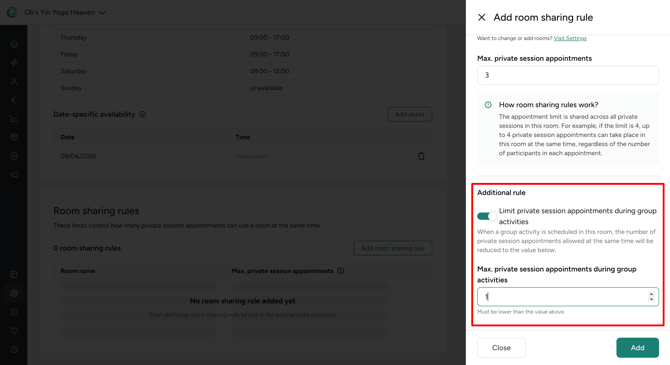
Group activities take up more space in a shared room. Therefore, you can reduce the private session limit whenever a group activity is scheduled in that room at the same time by enabling the limit private session appointments during group activities option. There you can enter the lower limit that should apply while a group activity runs.
You can edit or remove a room sharing rule anytime in Settings > Room sharing rules. Changing or removing a rule does not affect existing appointments.
💡 Tipp: You can also add a room sharing rule directly from a private session offer creation or edit.
🛠️ 2. Apply the rule to a private session offer
Every room sharing rule creation automatically applies to the private session offers that use that room.
If a private session offer needs the whole room instead, for example for corporate sessions or bachelor parties, you can override the rule for that offer:
- Open the private session offer.
- Go to the room selection step.
- Choose Whole room required for all selected rooms, or set it up per room under Configure room usage individually.
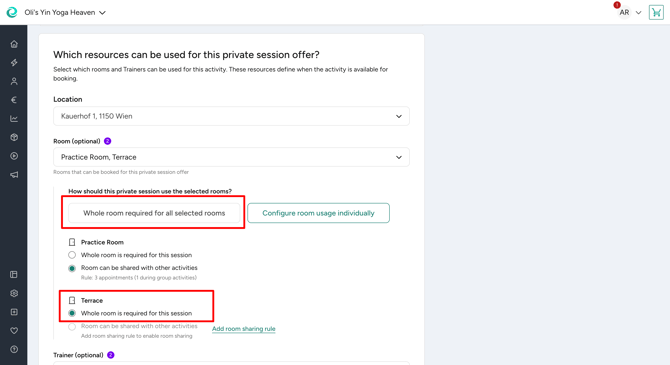
❗️Warning: If you select "Whole room is required," no other private session can share this room if there's an appointment scheduled at the same time, no matter what the room sharing rule generally allows.