-1.png?height=40&name=Logo%20Eversports%20Horizontal%20(1)-1.png)
In this article, you’ll learn:
- ℹ️ 1. What is the right to withdraw for online purchases?
- 💻 2. Which purchases are affected?
- ❌ 3. Which purchases are exempt?
- 📤 4. How do withdrawal requests work on Eversports?
- 💡 5. What should I do when I receive a request?
- 🙅 6. In which cases can I reject a withdrawal request?
- 💸 7. How are refunds handled?
-
📧 8. Email Templates for Communicating Refunds with Customers
ℹ️ 1. What is the right to withdraw for online purchases?
Under EU consumer protection law, your customers generally have the right to withdraw from certain online purchases within 14 days without needing to provide a reason.
To support legally compliant online sales, Eversports provides a structured withdrawal process for selected products purchased online. Your customers can submit withdrawal requests directly through their Eversports account, and you receive these requests by email.
This process ensures that your customers are informed about their rights before purchasing and that withdrawal requests can be submitted in a legally compliant way. Without this prior information, the legal withdrawal period may otherwise extend from 14 days up to 1 year.
Depending on the situation:
- a full or partial refund may apply
- or the withdrawal request may not be valid due to legal exceptions and can therefore be rejected
The purchase contract is concluded directly between you and your customer. This means you evaluate on a case-by-case basis whether a legal right to withdraw applies and, if necessary, handle the further process such as refunds or direct communication with the customer.
Eversports provides the online platform and the technical payment processing.
💻 2. Which purchases are affected?
The right to withdraw generally applies to products purchased online that are not tied to a fixed date or time period.
Your customers can submit withdrawal requests directly through Eversports for the following online purchases:
- Memberships
- Block cards
- Time cards
The right to withdraw may also apply to the following products. In these cases, your customers need to contact you directly by email:
- Vouchers
- Individual video purchases
❌ 3. Which purchases are exempt from the right to withdraw?
EU consumer protection law includes an exception for leisure and sports services: the right to withdraw generally does not apply to sports and leisure services with a fixed date or time period, for example:
- bookings for a specific activity with a single ticket
- bookings for activities consisting of multiple fixed sessions, such as workshops with combined tickets
- court bookings or room rentals, such as tennis court reservations
To reflect these legal requirements, the Eversports withdrawal flow only allows requests for eligible products.
📤 4. How do withdrawal requests work on Eversports?
Your customers can withdraw from the purchase of a product by submitting a withdrawal request directly through their Eversports account:
- Customers purchase a product online (e.g. block card, membership, etc.)
- They go to “My passes & memberships” in their Eversports account
- They open the detailed view of the purchased product. Within the first 14 days after purchase, the “Withdraw” button is displayed and accessible there.
- When your customers click “Withdraw”, a pop-up opens with a preview of the withdrawal request
- They confirm the request via “Confirm and send withdrawal request”
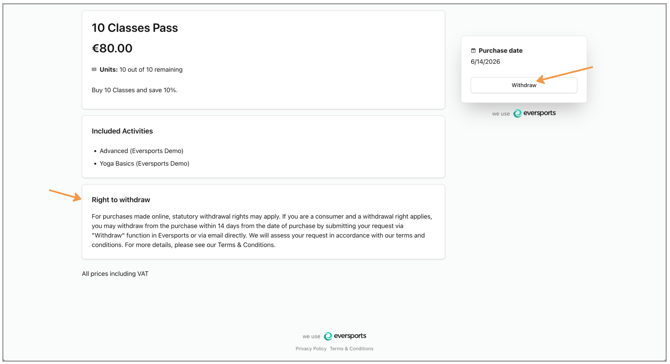
📩 This triggers two emails sent via Eversports:
- you as the provider receive the customer’s withdrawal request by email at your company email address.
-
your customer receives a confirmation email from Eversports confirming that the withdrawal request was sent.
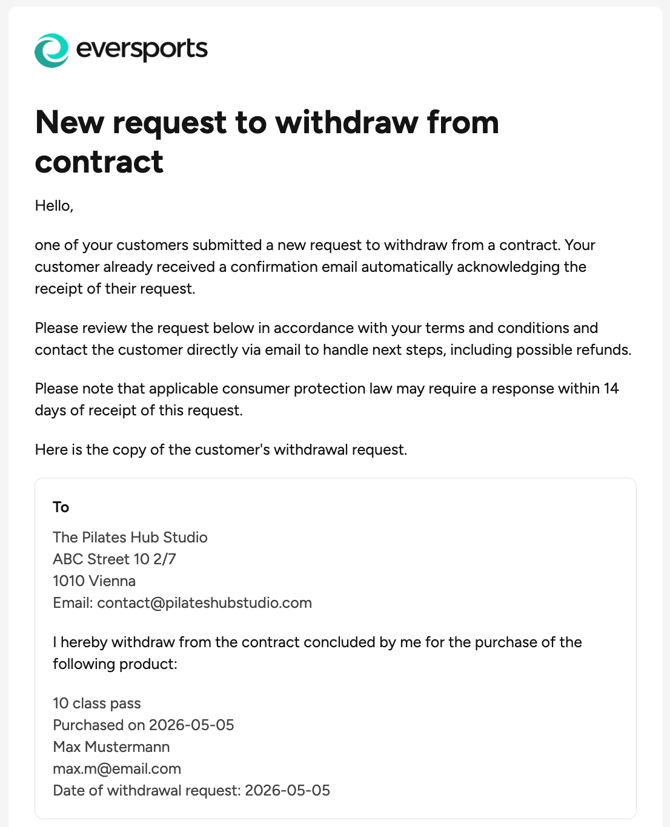
Both withdrawal request emails include the following information:
- product name
- purchase date
- customer name
- customer email address
- date of the withdrawal request
Example of withdrawal request you as a studio would receive:
💡 5. What should I do when I receive a withdrawal request?
If you receive a withdrawal request, we recommend the following steps:
✅ 1. REVIEW THE REQUEST
As you are the contractual party of the purchase, you remain responsible for evaluating individual cases and deciding whether a withdrawal request is valid.
The Eversports withdrawal process already checks several legal requirements automatically. This means your customers can only submit a request if, for example:
- ➡️ the purchase was made within the last 14 days
- ➡️ the product has not been fully used yet and is still valid
- ➡️ the purchased product is not tied to a fixed date or time period
In most cases, you mainly need to verify:
- whether the product was sold online or on-site
ℹ️ Please note: Your customers may also contact you outside of the Eversports withdrawal flow, for example by email or phone. In these cases, you should check whether the legal requirements for a withdrawal are fulfilled.
✅ 2. RESPOND AND REFUND WITHIN AN APPROPRIATE TIMEFRAME
Please note that valid withdrawal requests may need to be processed within 14 days after receiving the request, according to consumer protection law.
The legally relevant point in time is when your customer submitted the withdrawal request.
✅ 3. CONTACT YOUR CUSTOMERS DIRECTLY
Contact your customers directly by email to inform them about the evaluation of their request:
- whether the withdrawal request is valid
- whether a full or partial refund will be issued
- how the refund will be processed
You can find the customer’s email address in the withdrawal request email.
🙅 6. In which cases can I reject a withdrawal request?
A withdrawal request is only valid if all of the following criteria apply:
- ➡️ the purchase was made online
- ➡️ the purchase was made within the last 14 days
- ➡️ the product has not been fully used yet (e.g. with block cards)
- ➡️ the product is not tied to a fixed date or fixed time period (see above)
You can reject withdrawal requests if these legal requirements are not fulfilled.
ℹ️ Please note: Your customers may of course also contact you outside of the Eversports withdrawal flow. You remain responsible for evaluating individual cases.
💸 7. How are refunds to be handled?
Refunds are not automatically processed by Eversports as part of the withdrawal process. If a withdrawal request is accepted, the refund is handled directly between you and your customers.
📩 Please note: Once the refund has been completed, don’t forget to inform your customers (e.g. via E-Mail), as they will not receive an automatic notification from Eversports or Stripe about the refund process.
Below, we outline possible ways to document and handle refunds in Eversports while maintaining a clear record of the transaction:
⚫ FULL REFUNDS
For full refunds, we recommend canceling the invoice of the purchased product in Eversports Manager. The customer will automatically receive a refund via the same payment method used.
You can find step-by-step instructions in this Help Center article: How to cancel an invoice
⚫ PARTIAL REFUNDS
If a product has already been partially used, you can handle partial refunds as follows:
-
Create a new article called “Partial refund for invoice #12345” under “Products” and sell it to the customer with the negative amount of the invoice you want to refund and the payment type bank transfer. This way you balance out the sales.
-
Then transfer the amount to the customer manually outside of Eversports.
👉 You can find step-by-step instructions in this Help Center article: Creating a Credit Note
⚠️ Please note: if you cancel the invoice in the Manager, the full amount will be refunded to the customer.
⚫ MEMBERSHIPS paid via AUTOMATED SEPA
In this case you can proceed as follows:
- Create a new article called “Partial refund for invoice #12345” under “Products” and sell it to the customer with the negative amount of the invoice you want to refund and the payment type bank transfer. This way you balance out the sales.
- Then transfer the amount to the customer manually.
👉 You can find step-by-step instructions in this Help Center article: Creating a Credit Note
⚠️ Your customers can also request a dispute or chargeback through their online banking. This would trigger an automatic refund via Stripe, but you would still be charged chargeback fees, which is why we do not recommend this option.
📧 8. Email Templates for Communicating with Customers
Below, you’ll find two example templates you can use to inform your customers once a refund has been completed.
You can adjust the wording to match your own tone of voice and internal processes.
⚫ Template 1: Automatic Refund via Eversports / Stripe
This template is suitable if you canceled the invoice in Eversports Manager and the refund was processed automatically via Stripe.
Hi [Name],
we have reviewed your withdrawal request and successfully processed your refund.
The refund will automatically be returned via the same payment method that was originally used for the purchase. Please note that depending on your bank or payment provider, it may take a few business days until the amount is visible in your account.
If you have any questions, feel free to contact us anytime.
Best regards,
[Studio / Company Name]
⚫ Template 2: Manual Refund via Bank Transfer
This template is suitable if you processed the refund manually outside of Eversports.
Hi [Name],
we have reviewed your withdrawal request and successfully processed your refund.
The refund amount has been transferred to you manually via bank transfer. Depending on your bank, it may take a few business days until the amount is visible in your account.
If you have any questions, feel free to contact us anytime.
Best regards,
[Studio / Company Name]
By understanding how the withdrawal process works, you can handle customer requests transparently while supporting legally compliant online sales. If you have any questions, our Support Team is happy to help (support@eversports.com).